
Custom ecommerce website design and development
Homepage Design for Ecommerce
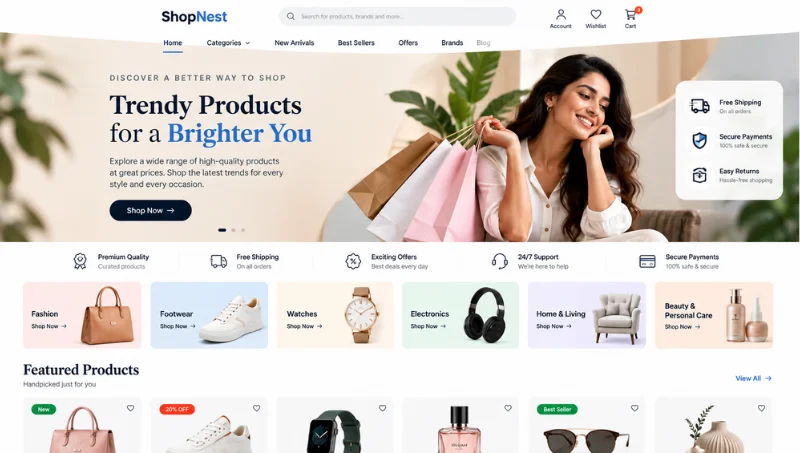
Design an Ecommerce Homepage Around Product Discovery and the Customer Journey
E-commerce homepage design should help customers quickly understand what the store offers, explore relevant catalogue sections, and navigate towards products or categories that match their interests. Effective homepage design brings together a clear visual hierarchy, intuitive navigation, promotional banners, and well-structured content sections to guide customers into the wider shopping experience.
EchoPx provides custom ecommerce website design and development for businesses that need an online store built around real catalogue, customer and operational requirements. For the homepage, theme functionality includes banner management, homepage section management, font and colour settings, while the wider ecommerce solution connects those homepage entry points with categories, search, product listings, product-detail pages, customer accounts, cart, checkout, payments, orders, shipping and administration.
- Custom ecommerce website design
- Ecommerce UI/UX design
- Custom ecommerce website development
- Online store development
- Product listing and product-detail page planning
- Customer account journey design
- Cart and wishlist experience
- Checkout flow design
- Payment and order workflow planning
- Shipping information and status flows
- Theme, banner and homepage section management
- CMS pages and administration
- API and mobile connectivity
- Ecommerce maintenance and support
Discuss Your Homepage Design for Ecommerce Requirements with EchoPx
19+
Years of experience
1500+
Clients
1700+
Projects
Rajajinagar
Bengaluru office
Beyond the first screen
Ecommerce Homepage Design Is More Than the First Screen
Ecommerce homepage design is not only about how the first screen looks. The homepage should support product discovery, explain useful store pathways and prepare customers for the navigation, product pages, accounts, cart and checkout experiences that follow.
EchoPx approaches ecommerce homepage design as part of one connected website design and development process. The objective is to define the catalogue, customer journeys and operating requirements first, then use the homepage to guide customers into the ecommerce functionality required to run the store.
What the homepage prepares customers for
- Navigation and search
- Categories and listings
- Product pages
- Customer accounts
- Cart
- Checkout
Business challenges
Business Challenges Ecommerce Homepage Design Should Address
Eight common homepage problems that good homepage design for ecommerce should solve.
The Homepage Does Not Explain the Store Quickly
Customers should be able to understand what the store offers and where to begin. Homepage structure should introduce useful product or category pathways without requiring visitors to interpret a crowded collection of unrelated sections.
Customers Cannot Find the Right Catalogue Entry Point
Categories, search, product listings and product-detail pages are part of the EchoPx feature set. The homepage should direct customers toward relevant catalogue entry points instead of trying to display the whole catalogue at once.
Homepage Content Does Not Lead into Product Discovery
Banners and homepage sections are most useful when they connect with relevant categories, product listings or other agreed shopping paths, rather than operating as an isolated promotional page.
Too Many Homepage Sections Compete for Attention
Homepage sections need a clear hierarchy. The design should prioritize the information and catalogue paths customers need first, while keeping secondary content from overwhelming the shopping journey.
Homepage Promotions Are Disconnected from Shopping Actions
Homepage content should lead into store actions such as browsing categories, opening product listings or viewing product-detail pages, without creating dead ends or implying functionality outside the agreed scope.
The Homepage Is Designed Separately from the Store Journey
The homepage, catalogue, product pages, accounts, cart and checkout should feel like parts of one website. Planning the homepage in isolation can create inconsistent navigation, labels and customer expectations.
Homepage Content Is Difficult to Maintain After Launch
Theme functionality includes banner management and homepage section management. The design should reflect the type and amount of content the business can update consistently after launch.
Homepage Structure Does Not Reflect Ongoing Store Management
The homepage should work with theme controls, CMS pages and administration responsibilities, so the internal team can keep store content aligned with the catalogue and customer journey.
Our approach
The EchoPx Ecommerce Homepage Design Approach
EchoPx combines custom ecommerce website design with ecommerce development capabilities. For homepage design, the solution includes theme customization, banner management, homepage section management, font and colour settings, alongside product categories, search, listing/detail pages, customer accounts, cart, checkout, payments, orders, shipping, CMS pages and administration.
This gives homepage design a practical foundation. Instead of treating the homepage as a stand-alone promotional surface, the design can reflect how products are organised, how customers enter the catalogue, what actions continue the shopping journey and what content the business expects to manage after launch.
Capabilities the homepage can draw on
- Theme customization
- Banner management
- Homepage section management
- Font and colour settings
- Product categories
- Search
- Listing and detail pages
- Customer accounts
- Cart and checkout
- Payments and orders
- Shipping
- CMS pages and administration
Homepage design services
Ecommerce Homepage Design Services: Homepage and Store Journeys
Eight ecommerce homepage design services covering the homepage and the journeys it starts.
Custom Ecommerce Homepage Design
EchoPx can plan the ecommerce homepage around catalogue entry points, banners, homepage sections and the customer journeys that continue into categories, search, product listings and product-detail pages.
Homepage UI/UX Planning
Homepage UI/UX planning can define content hierarchy, navigation, section order, catalogue entry points and the relationship between homepage content and deeper ecommerce journeys.
Online Store Homepage Design
The homepage can be planned as the first layer of a connected ecommerce experience rather than as a separate promotional page.
Homepage Product Discovery Planning
Homepage sections can guide customers toward categories, search, product listings and relevant product-detail journeys based on the agreed catalogue structure.
Homepage-to-Product Journey Design
Homepage entry points should lead naturally into the product information customers use for evaluation, including categories, listings, product details, images, attributes, variations and reviews where applicable.
Homepage Navigation to Customer Journeys
Homepage navigation and account entry points should remain consistent with customer registration/login, profiles, shipping addresses and order-history journeys.
Homepage-to-Cart Journey Alignment
Homepage product or catalogue pathways should connect cleanly with product pages and cart/wishlist actions rather than introducing purchase shortcuts that are outside scope.
Homepage-to-Checkout Journey Alignment
The homepage should prepare customers for the same navigation and terminology they encounter later in cart and checkout, helping the store feel like one coherent experience.
Connected services
Ecommerce Homepage Design Services: Content, Orders and Operations
Seven services that keep the homepage aligned with orders, content, administration and development.
Connected Payment and Order Experience
Homepage design should not overpromise payment or order functionality. Any payment or order messaging should stay aligned with checkout, payment-status and order-management capabilities.
Connected Shipping Information Experience
Where homepage content references delivery or shipping, the wording should remain consistent with shipping-zone, delivery-information and shipping-status capabilities.
Homepage Theme, Banner and Section Management
Theme functionality includes theme switching, theme customization, banner management, homepage section management, and font and colour settings.
Homepage and CMS Content Alignment
CMS pages can support business information alongside the catalogue. Homepage links and content should connect with those pages without duplicating or fragmenting information.
Homepage and Administration Alignment
The homepage should stay aligned with product categories, product data, themes and settings managed in the administration environment.
Homepage Design-Connected Development
Once the homepage hierarchy and journeys are defined, ecommerce functionality can be implemented through custom ecommerce website development.
Ecommerce Maintenance
Maintenance can support later product, content, theme, settings and workflow changes after launch.
Connected design
What Ecommerce Homepage Design Should Connect
A useful ecommerce website design should connect the pages customers see with the catalogue, customer, cart, checkout, payment, order and shipping workflows behind the store.
The visual structure should help customers make decisions while remaining aligned with the information administrators manage. The homepage is where that connection starts.
Workflows the homepage connects to
- Catalogue
- Customers
- Cart
- Checkout
- Payments
- Orders
- Shipping
- Administration
Product discovery
Use the Homepage to Start Product Discovery
Homepage sections, navigation, categories, search, product listings and product-detail pages should work as one discovery journey.
Product capabilities include categories, attributes, variations, images, bundles, reviews, search, listing pages and detail pages, so the design can reflect the catalogue rather than a generic page template.
One discovery journey
- Homepage sections
- Navigation
- Categories
- Search
- Product listings
- Product-detail pages
Purchase journey
Connect Homepage Entry Points with the Purchase Journey
Customer accounts, cart, wishlist and checkout should be planned as a connected purchase journey that starts from the homepage.
Capabilities include registration/login, profiles, multiple shipping addresses, quantity updates, item removal, cart summary, wishlist management, address selection, coupon support, loyalty support, payment selection, order creation and confirmation.
Purchase journey steps
- Registration/login and profiles
- Multiple shipping addresses
- Cart and wishlist actions
- Address selection
- Coupons and loyalty support
- Payment selection
- Order creation and confirmation
After checkout
Keep Homepage Messaging Consistent with Post-Purchase Information
The customer experience continues after checkout. Order history, order details, invoice download, order tracking, delivery information and shipping-status tracking should remain understandable.
Homepage messaging should stay aligned with the order and shipping information managed by the administration team, so customers never see promises the store cannot keep.
Post-purchase information
- Order history
- Order details
- Invoice download
- Order tracking
- Delivery information
- Shipping-status tracking
Design and development
Homepage Design and Ecommerce Development Work Together
Ecommerce web design defines how customers understand and move through the store. Ecommerce development implements the functionality that makes those journeys work. Navigation should reflect the catalogue structure, product pages should reflect product data, cart and checkout should reflect the purchase workflow, and order/shipping pages should reflect operational information.
Once the customer journeys are defined, ecommerce functionality can be implemented through custom ecommerce website development. Homepage UI/UX should reflect the actions customers actually perform, from browsing products to reviewing order and shipping information.
What homepage design defines
- Content hierarchy and navigation
- Banners and homepage sections
- Catalogue entry points
- Calls to action and where they lead
- Consistent labels across the store
What development adds beyond the homepage
- Product management and customer accounts
- Cart, wishlist and checkout
- Online payment integration support and order management
- Shipping management and administration
- APIs and mobile connectivity
Design scope
What an Ecommerce Homepage Design Should Cover
A practical ecommerce site web design scope can include homepage structure, navigation, category and product listing pages, product-detail pages, customer-account journeys, cart and wishlist states, checkout flows, payment and order information, shipping information, theme controls and CMS pages.
The exact combination should follow the catalogue, customer actions and administration requirements the business actually needs. The homepage is planned first because it introduces every other area.
Areas the design scope can include
- Homepage structure
- Navigation
- Category and listing pages
- Product-detail pages
- Customer-account journeys
- Cart and wishlist states
- Checkout flows
- Payment and order information
- Shipping information
- Theme controls
- CMS pages
Content hierarchy
Homepage Content Hierarchy
The homepage should establish a clear order of attention. A practical hierarchy can introduce the store, provide useful catalogue entry points, support selected homepage sections and then lead customers deeper into categories, listings or product-detail pages.
The exact order should reflect the catalogue and business requirements rather than a fixed template.
A practical order of attention
- Introduce the store
- Offer useful catalogue entry points
- Support selected homepage sections
- Lead into categories, listings or product details
Banners and sections
Banner and Homepage Section Planning
Theme functionality includes banner management and homepage section management.
Before design, define which banners and sections the business expects to maintain, what each section is meant to help customers do, and where each section should lead.
Decide for each banner or section
- Which ones the business will maintain
- What it helps customers do
- Where it leads
- Who updates it after launch
Navigation and search
Homepage Navigation and Search
The homepage should work with the wider navigation and search experience.
Category structure, search and product listings are EchoPx capabilities, so homepage links and labels should use the same catalogue language customers encounter deeper in the store.
Keep consistent across the store
- Category names
- Search
- Product listing labels
- Navigation order
- Account entry points
Homepage discovery
Homepage Product Discovery
A homepage can support product discovery by guiding customers into relevant categories, search results, listings or product-detail journeys.
It should not try to replace the catalogue or overload the page with every product option. The homepage starts discovery; listing and product-detail pages complete it.
Where homepage discovery leads
- Relevant categories
- Search results
- Product listings
- Product-detail journeys
Calls to action
Homepage Calls to Action
Homepage calls to action should connect with real destinations and functions.
Clear labels can guide customers to categories, listings, product details or other agreed store content without promising unsupported features or outcomes.
Calls to action can lead to
- Categories
- Product listings
- Product details
- Other agreed store content
After launch
Homepage Content Management After Launch
A homepage is easier to maintain when the design matches the content the business can update consistently.
Banners, homepage sections, fonts, colours, themes and CMS content should be planned with ongoing administration in mind, so the homepage stays accurate as the catalogue changes.
Theme and content controls
- Banners
- Homepage sections
- Font settings
- Colour settings
- Theme switching
- Theme customization
- CMS pages
Homepage layout
Ecommerce Homepage Layout: Planning Each Homepage Area
A practical way to plan an ecommerce homepage layout, and ecommerce website layout design more widely, is area by area: what each part helps customers do, and what the design has to decide for it.
Feature set
EchoPx Ecommerce Feature Set
The functionality an ecommerce homepage, and the store behind it, can be built around.
Seven steps
Our Ecommerce Homepage Design Process
Seven steps from catalogue discovery to launch and homepage maintenance.
Catalogue & Homepage Discovery
We begin with the catalogue, categories, product information, customer journeys and homepage content requirements so the homepage reflects what the business actually sells.
Homepage Goals & Functional Scope
Homepage sections, banners, navigation, search, catalogue entry points, customer journeys and administration requirements are translated into a clear design scope.
Navigation, Search & Catalogue Entry Planning
Categories, search, product listings and product-detail journeys are mapped so the homepage guides customers into the store consistently.
Homepage UI/UX & Section Design
Homepage hierarchy, banners, sections, navigation and calls to action are designed around the agreed catalogue and customer journeys.
Design-Connected Ecommerce Development
Ecommerce functions are implemented according to the agreed homepage, storefront and wider ecommerce design and development scope.
Homepage, Storefront & Admin Review
Homepage pathways, deeper storefront pages and administration responsibilities are reviewed together so catalogue and content information remain aligned.
Launch & Homepage Maintenance
The homepage and wider store are prepared for launch, with maintenance available for future product, content, theme, section and workflow changes.
Layout and catalogue size
Homepage Layout and Content Hierarchy
The homepage should help customers understand the store and move toward relevant products. Theme functionality includes banner management and homepage section management, which can support a structured presentation of store content.
The right homepage structure depends on the catalogue and customer journey. The design should be based on the products and content the team can maintain after launch.
Small focused range
A business with a small focused range may need a simple route into product categories.
- Short route into categories
- A few clear entry points
- Fewer sections to maintain
Larger catalogue
A larger catalogue may need clearer sectioning and stronger discovery paths.
- Grouped category pathways
- More visible search
- More structured homepage sections
Categories and listings
Homepage Links to Categories and Product Listings
Category and product listing pages connect navigation with product evaluation. They should help customers understand the available range and decide which product deserves a closer look.
Product categories, search and listing/detail-page capabilities are part of the EchoPx feature set. Design decisions should therefore be coordinated with the way product data is structured in the administration environment.
What listing pages connect
- Homepage navigation
- Categories
- Search
- Product information
- Paths to product-detail pages
Product pages
Homepage-to-Product Page Continuity
A product-detail page should bring together the information required to evaluate and select a product. Depending on the agreed scope, that may include product images, attributes, variations, bundles, reviews and purchase actions.
The page hierarchy should prioritize information that matters to the purchase decision, and should use the same labels customers saw on the homepage so the journey feels continuous.
Possible product-detail elements
- Product images
- Attributes
- Variations
- Bundles
- Reviews
- Purchase actions
Accounts, cart and checkout
Homepage Navigation to Accounts, Cart and Checkout
Customer accounts, cart and checkout should feel like one purchase journey. Registration and login, profiles, multiple shipping addresses, cart actions, wishlist management and checkout steps all influence how customers move through the website.
Checkout can include address selection, coupons, loyalty support, payment selection, order creation and confirmation. Designing that sequence before development makes it easier to define what customers see at each stage and what information the administration team needs later.
Account
- Registration and login
- Profiles
- Multiple shipping addresses
Cart
- Cart actions
- Wishlist management
- Cart summary
Checkout
- Address selection
- Coupons and loyalty support
- Payment selection
Confirmation
- Order creation
- Order confirmation
- Order history
Orders and shipping
Homepage Messaging Around Orders and Shipping
The ecommerce experience continues after checkout. Order history, order details, invoice download, order tracking, delivery information and shipping-status tracking all affect how customers understand what happens next.
These screens should stay aligned with the order/payment status updates and shipping information managed by the administration team.
Post-purchase screens
- Order history
- Order details
- Invoice download
- Order tracking
- Delivery information
- Shipping-status tracking
Storefront
Homepage as the Storefront Entry Point
The storefront should present a clear path from broad store discovery into categories, product listings and product-detail pages.
Theme controls, banners and homepage sections can support the storefront presentation while product, customer, cart and checkout functionality supports the deeper shopping journey. Good ecommerce storefront design starts with the homepage.
Storefront building blocks
- Theme controls
- Banners
- Homepage sections
- Categories
- Product listings
- Product-detail pages
Landing and CMS pages
Homepage, Landing-Style Content and CMS Pages
CMS pages can support additional business information and ecommerce content alongside the catalogue. Where a landing-style page is required, it should connect logically with the store rather than behave like a disconnected marketing page.
The content and calls to action should lead customers toward relevant catalogue or shopping actions. The same rule applies to ecommerce landing page design as to the homepage.
Landing and CMS pages should
- Support business information
- Carry additional ecommerce content
- Connect logically with the store
- Lead to relevant catalogue or shopping actions
Custom design
Custom Homepage Design Within the Online Store
Custom ecommerce website design allows the page structure and customer journeys to be planned around the actual catalogue and operating requirements.
The design scope should begin with products, categories, customer actions, checkout rules, payment choices, shipping needs and administration responsibilities rather than with a generic visual template.
Where custom homepage design starts
- Products and categories
- Customer actions
- Checkout rules
- Payment choices
- Shipping needs
- Administration responsibilities
Visual design
Homepage Design Should Follow Business Requirements
Visual choices such as page hierarchy, spacing, typography and content emphasis should support the customer journey rather than compete with it. Clear presentation and product-focused experiences matter, but EchoPx does not copy design-gallery styles or assume that one visual trend suits every store.
The better starting point is the catalogue and the actions customers need to take. Once those requirements are clear, visual design can support navigation, product evaluation, purchase and post-purchase activity.
Visual choices that serve the journey
- Page hierarchy
- Spacing
- Typography
- Content emphasis
New or existing
Designing a New Ecommerce Homepage vs. Improving Existing Homepage Areas
A new homepage and an improvement project start from different places.
New ecommerce homepage
A new ecommerce website can define the homepage structure, catalogue entry points, customer journeys and store-management responsibilities from the beginning.
- Homepage structure
- Catalogue entry points
- Customer journeys
- Store-management responsibilities
Improving existing homepage areas
An existing store may need selected homepage improvements around banners, homepage sections, catalogue entry points, product-discovery paths, theme controls, CMS content and related ecommerce journeys.
- Banners
- Homepage sections
- Catalogue entry points
- Product-discovery paths
- Theme controls
- CMS content
Improvements are scoped around the specific homepage and store requirements the business needs. EchoPx does not offer a separate redesign-specialist service.
Benefits
Benefits of Custom Ecommerce Homepage Design
What a requirements-led approach to the homepage gives the store.
- Homepage decisions grounded in the actual catalogue and customer journey.
- Clearer entry points into categories, search, listings and product-detail pages.
- Banners and homepage sections planned around useful customer actions.
- Homepage navigation aligned with the wider storefront experience.
- Homepage messaging connected with cart, checkout, order and shipping workflows.
- Theme and homepage content controls aligned with ongoing store management.
- A clear path from homepage UI/UX into custom ecommerce development.
- Ongoing maintenance available for future product, content, theme and homepage changes.
Preparation checklist
How to Prepare for an Ecommerce Homepage Design Project
Use this checklist before your first homepage design discussion.
- Prepare the launch product list and category structure.
- Identify the homepage catalogue entry points customers should see first.
- List the banners and homepage sections the business expects to manage.
- Define where each homepage section should lead: category, search, listing, product or CMS content.
- Document product information that influences discovery, including attributes, variations, images and reviews.
- Map homepage navigation to account, cart and checkout entry points.
- Define the homepage content hierarchy and calls to action.
- Identify theme, font, colour and CMS requirements that need administration support.
- Separate launch-critical homepage content from later additions.
- Assign ongoing responsibility for banners, homepage sections and store content.
Comparison checklist
How to Compare Ecommerce Homepage Design Providers
Use this checklist to compare ecommerce website designers and ecommerce web designers on the same terms.
- Ask how the provider will review the catalogue before structuring the homepage.
- Review how banners, homepage sections, navigation and search will support product discovery.
- Clarify where homepage calls to action will lead within the catalogue or store.
- Confirm how homepage content will stay consistent with product, account, cart and checkout journeys.
- Understand how homepage design connects with theme controls, CMS content and administration.
- Separate launch-critical homepage content from later additions.
- Define who will manage banners, homepage sections and content after launch.
- Evaluate the proposal against the actual catalogue, customer journey and maintenance requirements.
Business requirements
Industries & Business Requirements
Ecommerce homepage requirements vary by catalogue structure, product information, customer journeys, content priorities and administration needs. The homepage is scoped around the actual products, categories, customer actions and store-management responsibilities rather than a B2B/B2C or platform-specific label.
A focused catalogue may need a small number of clear homepage entry points. A more detailed catalogue may need stronger category pathways, search visibility and more structured homepage sections. The same principle applies to content: the homepage should reflect what the business can maintain consistently after launch.
What shapes homepage requirements
- Catalogue structure
- Product information
- Customer journeys
- Content priorities
- Administration needs
Search terms
Common Searches About Ecommerce Homepage Design
People researching homepage design for ecommerce use many phrases: ecommerce homepage design, ecommerce website homepage design, e commerce homepage design, online store homepage design and shopping website homepage design. Related searches include ecommerce homepage layout, ecommerce website layout design, ecommerce storefront design, ecommerce landing page design, ecommerce homepage UI UX design, ecommerce website design, ecommerce web design and ecommerce site design. This page covers each of those topics.
Buyers comparing providers search for ecommerce homepage design services, ecommerce website design services, an ecommerce homepage designer, ecommerce website designers, ecommerce web designers, an ecommerce website design company or an ecommerce web design company. EchoPx offers custom ecommerce homepage design as part of custom ecommerce website design and development.
Some searches use labels such as best ecommerce homepage design, best ecommerce website design, professional ecommerce homepage design, responsive ecommerce homepage design, mobile friendly ecommerce homepage design or affordable ecommerce homepage design. These are search terms only; EchoPx does not make ranking, professional-superiority, responsive-specialization or affordability claims.
Platform, segment, agency and redesign searches such as Shopify homepage design, WooCommerce homepage design, B2B ecommerce homepage design, B2C ecommerce homepage design, ecommerce homepage design agency and ecommerce homepage redesign describe positioning this page does not claim. EchoPx scopes the homepage around each store's catalogue, customers and operations.
Getting started
How to Start an Ecommerce Homepage Design Project With EchoPx
Begin by phone, by email or through the enquiry form on this page.
Share your catalogue
Send your catalogue structure and the entry points customers need first.
Describe the journeys
Outline homepage content priorities, the customer journey and administration needs.
Define the scope
EchoPx uses that information to define a custom ecommerce website design and development scope.
Why EchoPx
Why Choose EchoPx
- 19+ years.
- 1500+ clients.
- 1700+ projects.
- Primary focus on custom ecommerce website design and development.
- Ecommerce UI/UX design and online-store development.
- Product, customer, cart, checkout, payment, order and shipping functionality.
- Theme, CMS and administration capabilities for ongoing store management.
- API backend and mobile connectivity support.
- Ecommerce maintenance and support for evolving requirements.
These facts support EchoPx's custom ecommerce website design and development positioning. They do not establish a best/top ranking, professional-superiority claim, affordability claim, B2B/B2C specialization, responsive/mobile-friendly specialization, platform-specific design capability or dedicated redesign-service specialization.
EchoPx in numbers
19+
Years of experience
1500+
Clients
1700+
Projects
Bengaluru
Rajajinagar office
Contact
Talk to EchoPx About Your Homepage
Discuss your homepage design for ecommerce requirements by phone or email, or visit the EchoPx office in Rajajinagar, Bengaluru.
Address177, 19th Main Rd, A Block, Milk Colony, Rajajinagar, Bengaluru 560021
LandmarkNear Sri Shakti Devi Karumari Amman Temple
Phone+91 97399 66977
Emailinfo@echopx.com
Office hoursMonday to Friday 10am - 5pm, Saturday 10am - 2pm, Sunday closed
Related pages
Related Ecommerce Guides and Services
FAQ
Frequently Asked Questions About Homepage Design for Ecommerce
How do I start an ecommerce homepage design project with EchoPx?
Share the catalogue structure, homepage content priorities, customer journey, required ecommerce functions and administration needs. EchoPx can use that information to define an appropriate custom ecommerce website design and development scope.
Does EchoPx provide ecommerce maintenance after launch?
Yes. Ecommerce maintenance and support are part of the EchoPx ecommerce service scope.
Can EchoPx improve selected areas of an existing ecommerce homepage?
Yes. Selected improvements can be scoped around areas such as homepage sections, banners, catalogue entry points, theme controls, CMS content and related ecommerce journeys. EchoPx does not offer a separate redesign-specialist service.
Can EchoPx design an ecommerce homepage around a custom catalogue?
Yes. Custom ecommerce website design is an EchoPx service. Homepage structure can be planned around the actual categories, product information and customer journeys in the agreed scope.
Can CMS pages be connected from the homepage?
Yes. CMS pages are part of the EchoPx ecommerce solution and can support additional business information and website content alongside the catalogue.
Can the homepage design use theme controls?
Yes. Theme functionality includes theme switching, theme customization, banner management, homepage section management, and font and colour settings.
Can homepage design connect with payment, order and shipping information?
Yes. Homepage messaging and navigation can be aligned with the payment, order and shipping functionality so the wider store experience remains consistent.
Can the homepage design connect with customer accounts, cart and checkout?
Yes. The homepage navigation and customer journeys can be planned to connect with customer-account, cart, wishlist and checkout functionality.
Does EchoPx provide ecommerce homepage UI/UX design?
Yes. Ecommerce UI/UX design is part of the EchoPx ecommerce service scope.
Can the homepage support product discovery?
Yes. The homepage can guide customers into categories, search, listings and product-detail journeys. The exact discovery structure should reflect the agreed catalogue.
Can the homepage link to product categories and listings?
Yes. Product categories, search, product listing pages and product-detail pages are part of the feature set, so homepage entry points can be planned around those journeys.
Can the homepage include multiple content sections?
Yes. Homepage section management is part of the theme functionality. The section structure should reflect the catalogue, content priorities and customer journey.
Can the ecommerce homepage include banners?
Yes. Banner management is part of the EchoPx theme functionality. The design should define how banners support the catalogue and customer journey.
Does EchoPx provide ecommerce homepage design?
Yes. EchoPx provides custom ecommerce website design and ecommerce UI/UX design. Homepage planning can be included as part of the custom ecommerce website design and development scope.
What should homepage design for ecommerce include?
Homepage design for ecommerce can include content hierarchy, navigation, catalogue entry points, banners, homepage sections, calls to action and clear connections to categories, search, product listings, product-detail pages and other ecommerce journeys.
What is an ecommerce homepage layout?
It is the order and grouping of homepage elements such as navigation, banners, category entry points, product discovery sections, calls to action and store information. The right layout depends on the catalogue and customer journey.
How many sections should an ecommerce homepage have?
There is no fixed number. A small focused range may need only a few clear entry points, while a larger catalogue may need more structured sections. Include only sections the team can maintain after launch.
Where should homepage calls to action lead?
Each call to action should lead to a real destination, such as a category, a product listing, a product-detail page or other agreed store content.
Who should manage the homepage after launch?
Agree before launch who maintains banners, homepage sections, theme settings and CMS content, and which changes need development support.
Does EchoPx provide responsive or mobile-friendly ecommerce homepage design?
EchoPx does not claim a separate responsive or mobile-friendly homepage design specialization. Its scope includes ecommerce UI/UX design and mobile connectivity support.
Does EchoPx provide Shopify or WooCommerce homepage design?
Platform-specific homepage design for Shopify or WooCommerce is not part of the services described on this page.
Does EchoPx specialize in B2B or B2C ecommerce homepage design?
EchoPx does not claim B2B or B2C specialization. Homepages are scoped around actual catalogue, customer and operational requirements.
Is EchoPx the best ecommerce homepage design company?
EchoPx makes no best or top ranking claim. It describes itself through its custom ecommerce website design and development capabilities.
Does EchoPx offer affordable or low-cost ecommerce homepage design?
EchoPx does not make affordable, low-cost or cheap pricing claims. Cost depends on the agreed design and development scope.
Does the ecommerce website include an admin panel?
The EchoPx solution includes an admin panel for products, categories, customers, orders, reviews, refunds, tickets, themes and website settings.
Does EchoPx support online payment integration?
Yes. The feature set includes online payment integration support, COD, payment-status tracking and failed-payment handling.
What should I prepare before an ecommerce homepage design project?
Prepare your product list and categories, the entry points customers should see first, the banners and sections you will manage, where each section leads, and your account, cart and checkout entry points.
How should I compare ecommerce homepage design providers?
Compare how each provider reviews the catalogue, plans banners, sections, navigation and search, connects the homepage to deeper journeys and handles content management after launch.
What are the steps in the EchoPx ecommerce homepage design process?
Catalogue and homepage discovery, homepage goals and functional scope, navigation and catalogue entry planning, homepage UI/UX and section design, design-connected development, homepage and admin review, and launch with maintenance.
Where is the EchoPx office?
EchoPx is located at 177, 19th Main Rd, A Block, Milk Colony, Rajajinagar, Bengaluru 560021, near Sri Shakti Devi Karumari Amman Temple.
What are the EchoPx office hours?
Monday to Friday 10am to 5pm and Saturday 10am to 2pm. The office is closed on Sunday.
How can I contact EchoPx about ecommerce homepage design?
Call +91 97399 66977, email info@echopx.com or use the enquiry form on this page to share your requirements.
Next step
Plan Your Ecommerce Homepage Design with EchoPx
If you are planning homepage design for ecommerce, start with the catalogue, the entry points customers need first, the banners and homepage sections the business can maintain, and the journeys that continue into categories, search, products, accounts, cart and checkout. EchoPx can help translate those requirements into a custom ecommerce website design and development scope.