
Custom ecommerce website design and development
Ecommerce Homepage Design
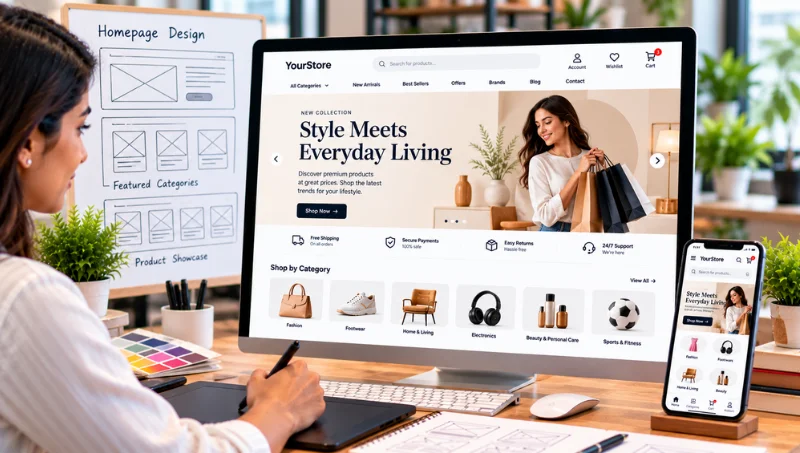
Design an Ecommerce Homepage Around Products, Categories and the Customer Journey
Effective e-commerce homepage design helps customers quickly understand what your store offers, explore relevant categories and products, and navigate easily through the shopping journey. While the homepage is only one part of the overall e-commerce experience, it serves as an important starting point where product discovery, navigation, promotional content, and clear calls to action come together.
EchoPx provides custom ecommerce website design and development for businesses that need an online store built around real catalogue, customer and operational requirements. For ecommerce website homepage design, the scope can connect banners, homepage sections, theme controls and ecommerce UI/UX with category pathways, product discovery, customer journeys and the deeper product, cart, checkout, payment, order and shipping experiences.
- Custom ecommerce website design
- Ecommerce UI/UX design
- Custom ecommerce website development
- Online store development
- Product listing and product-detail page planning
- Customer account journey design
- Cart and wishlist experience
- Checkout flow design
- Payment and order workflow planning
- Shipping information and status flows
- Theme, banner and homepage section management
- CMS pages and administration
- API and mobile connectivity
- Ecommerce maintenance and support
Discuss Your Ecommerce Homepage Design Requirements with EchoPx
19+
Years of experience
1500+
Clients
1700+
Projects
Rajajinagar
Bengaluru office
The whole store
Ecommerce Homepage Design Is Part of the Whole Store
Designing an ecommerce website is not only about how the homepage looks. The design has to support product discovery, product comparison, account activity, cart decisions, checkout, payment selection, order confirmation and post-purchase information. Behind those screens, the business needs practical ways to manage products, categories, customers, orders, reviews, refunds, tickets, themes and website settings.
EchoPx approaches ecommerce design as part of one connected website design and development process. The objective is to define the catalogue, customer journeys and operating requirements first, then design and develop the storefront, starting with the homepage, around the functionality the business actually needs.
What the homepage leads into
- Category and listing pages
- Product-detail pages
- Customer accounts
- Cart and wishlist
- Checkout and payment
- Order and shipping information
Homepage purpose
What an Ecommerce Homepage Should Help Customers Do
A useful ecommerce homepage should quickly communicate what the store offers and provide clear routes into the catalogue. It can use banner and homepage-section controls to organise merchandising content, category entry points and other store information according to the business requirements.
The exact homepage structure should be driven by the catalogue and the customer journey. A focused catalogue may need a simple set of category or product pathways, while a larger catalogue may require more deliberate grouping and discovery sections. The homepage should only include content that the business can maintain after launch.
A useful homepage helps customers
- Understand what the store offers
- Find clear routes into the catalogue
- Reach relevant categories and products
- Access their account and cart
- Take a meaningful next step
Business challenges
Business Challenges Ecommerce Homepage Design Should Address
Eight common store problems that begin on the homepage and continue through the rest of the purchase journey.
Customers Cannot Understand the Catalogue Quickly
Categories, attributes, variations, images, bundles and search requirements influence how products should be organised. Design should help customers understand where they are and how to move between relevant products.
Product Listings Do Not Support Comparison
Listing pages should present useful product information and clear paths to product-detail pages. The information hierarchy should reflect the data the business can maintain consistently.
Product-Detail Pages Feel Disconnected from Purchase Actions
Images, product information, variations, reviews and add-to-cart actions should work together so the customer can evaluate the product before moving toward purchase.
Customer Account Screens Interrupt the Journey
Registration, login, OTP verification, password reset, profiles, multiple shipping addresses and order history should support shopping and post-purchase activity rather than feeling like unrelated pages.
Cart and Wishlist States Are Difficult to Understand
Customers need clear feedback when products are added, quantities change, items are removed or saved for later. The cart summary should prepare customers for checkout.
Checkout Contains Too Many Unclear Decisions
Address selection, coupons, loyalty support, payment selection, order creation and confirmation need a clear sequence. The design should make the next action understandable at each step.
Payment, Order and Shipping Information Looks Fragmented
Payment status, order status, delivery information and shipping status need consistent presentation so customers can understand what happens after checkout.
The Storefront Cannot Be Managed Easily After Launch
Theme switching, theme customization, banners, homepage sections, font and colour settings, CMS pages and admin controls should support ongoing store management.
Our approach
The EchoPx Ecommerce Homepage Design Approach
EchoPx combines custom ecommerce website design with ecommerce development capabilities. The available solution includes an ecommerce website, admin panel, multiple ecommerce templates, API backend, Android APK support, product management, order management, payment system, shipping system, customer account management, theme builder and CMS pages.
This gives the design process a practical foundation. Instead of treating UI/UX as a set of isolated screens, the design can reflect how products are managed, how customers move through the store, how orders are created, how payment and shipping information is presented and how the business operates the site after launch.
Capabilities the design can draw on
- Ecommerce website
- Admin panel
- Multiple ecommerce templates
- API backend
- Android APK support
- Product management
- Order management
- Payment system
- Shipping system
- Customer account management
- Theme builder
- CMS pages
Homepage design services
Ecommerce Homepage Design Services: Homepage and Storefront
Eight services covering the homepage and the storefront pages it leads customers into.
Custom Ecommerce Website Design
EchoPx can design an ecommerce homepage around the catalogue, product-discovery paths, category priorities, banner content and the customer journey into product pages and checkout.
Ecommerce UI/UX Design
UI/UX planning can define homepage hierarchy, navigation, category pathways, banner placement, homepage sections and the transition from the homepage into product listings, product details, account journeys and checkout.
Online Store Design
The homepage should act as an entry point into a connected store experience rather than a standalone marketing page. Category links, product discovery, customer-account access and shopping actions should lead naturally into the rest of the ecommerce site.
Product Listing Design
Listing pages can be structured around categories, search and the product information customers need before opening a detail page.
Product-Detail Page Design
Product-detail pages can bring together product information, images, variations, reviews and purchase actions supported by the product feature set.
Customer Account Experience
Account journeys can include registration/login, OTP verification, password reset, profiles, multiple shipping addresses and order history.
Cart & Wishlist Experience
The design can account for add to cart, quantity updates, item removal, cart summary and wishlist management.
Checkout Flow Design
Checkout can be designed around address selection, order creation, coupon support, loyalty support, payment selection and order confirmation.
Connected services
Ecommerce Homepage Design Services: Content, Orders and Operations
Seven services that connect the homepage to orders, content, administration and development.
Payment & Order Experience
Payment choices, payment status, failed-payment handling, order history, order details, invoice download and tracking should be presented as connected customer flows.
Shipping Information Experience
The design can accommodate shipping zones, delivery-charge information, delivery details and shipping-status tracking.
Theme & Homepage Management
Theme functionality includes theme switching, theme customization, banners, homepage sections, font settings and colour settings.
CMS Page Design
CMS pages can support business information and additional website content alongside the ecommerce catalogue.
Admin Experience Alignment
The customer-facing design should remain aligned with the products, categories, customers, orders, reviews, refunds, tickets, themes and settings managed in the admin area.
Design-Connected Development
Once the customer journeys are defined, ecommerce functionality can be implemented through custom ecommerce website development.
Ecommerce Maintenance
Maintenance can support later product, content, theme, settings and workflow changes after launch.
First impression
Homepage Visual Hierarchy and First Impression
The homepage should make the store's purpose and next steps easy to understand. A clear hierarchy can help customers distinguish primary navigation, key category or product pathways, supporting content and calls to action.
Brand clarity and visual hierarchy are widely recommended principles, but EchoPx applies them according to the specific catalogue and business requirements rather than copying a third-party layout. What customers see first should reflect what most of them need to do first.
What the hierarchy should separate
- Primary navigation
- Key category pathways
- Key product pathways
- Supporting content
- Calls to action
Navigation
Homepage Navigation and Category Pathways
Navigation should connect the homepage to the deeper ecommerce structure. Category links, search and other discovery pathways should help customers move from a broad store overview into product listings and detail pages without unnecessary confusion. The correct navigation model depends on the catalogue structure defined during project discovery.
In homepage design for ecommerce stores with many categories, navigation may need clearer grouping; a smaller range may need only a few direct category links. Either way, every pathway should lead to a listing or product page that is maintained and accurate.
Pathways from the homepage
- Category links
- Search
- Product listings
- Product-detail pages
- Customer account access
Banners and sections
Homepage Banners and Store Sections
EchoPx theme functionality includes banners and homepage sections. These controls can be used to organise selected store content, featured category pathways, merchandising messages or other homepage information the business has agreed. The number and purpose of sections should remain manageable for the team that will maintain them after launch.
Before designing banner areas, decide what each one is for, where it leads, who will update it and how often. A banner that points customers to a range they actually need is more useful than one that only decorates the page.
Decide for each banner or section
- Its purpose
- Where it leads
- Who updates it
- How often it changes
- What happens when it goes out of date
Product discovery
Homepage Product Discovery
The homepage can support product discovery by directing customers toward relevant catalogue areas. Search, categories, product listings and product-detail pages are part of the EchoPx product feature set, so homepage pathways should connect cleanly with those deeper product experiences.
Discovery sections work best when they reflect the real catalogue structure: categories customers recognise, product groupings the team can maintain and search that returns useful results. The homepage starts discovery; listing and product-detail pages complete it.
Discovery tools the homepage can connect
- Categories
- Search
- Product listings
- Product-detail pages
- Featured category pathways
Calls to action
Homepage Calls to Action
Calls to action should reflect the actions customers can actually take next. Depending on the catalogue and page structure, that may mean moving into a category, opening a product, accessing the customer account or continuing into a shopping flow. The page should avoid decorative calls to action that do not map to a meaningful customer journey.
Fewer, clearer calls to action are easier to understand than many competing ones. Each should be specific about where it leads, so customers know whether they are about to browse a category, open a product or continue to their cart.
Meaningful homepage calls to action
- Move into a category
- Open a product
- Access the customer account
- Continue into a shopping flow
After launch
Homepage Content Management After Launch
Homepage design should account for ongoing management. Banners, homepage sections, font settings, colour settings and CMS pages are part of the EchoPx theme and content capabilities. Before launch, define which homepage elements the business expects to update frequently and which changes may require development support.
A homepage that looks complete at launch can quickly become inaccurate if nobody owns its content. Agreeing ownership early keeps banners, sections and featured pathways current as the catalogue changes.
Theme and content controls
- Banners
- Homepage sections
- Font settings
- Colour settings
- Theme switching
- Theme customization
- CMS pages
Homepage layout
Ecommerce Homepage Layout: Planning Each Homepage Area
A practical way to plan an ecommerce homepage layout is area by area: what each part helps customers do, and what the design has to decide for it.
Catalogue size
Matching the Homepage to the Size of the Catalogue
The same homepage structure rarely suits every catalogue. Start from the range you actually sell.
Focused catalogue
A smaller, focused range may need a simple set of category or product pathways and only a few homepage sections.
- Short route into categories
- A few clear product pathways
- Fewer sections to maintain
- Direct calls to action
Larger catalogue
A larger catalogue may require more deliberate grouping, more prominent search and more discovery sections, each with a clear owner.
- Grouped category navigation
- More prominent search
- More discovery sections
- Clear ownership of each section
Feature set
Ecommerce Feature Set Behind the Homepage
The functionality an ecommerce homepage, and the pages it leads into, can be built around.
Seven steps
Our Ecommerce Homepage Design Process
Seven steps from catalogue discovery to launch and maintenance.
Business & Catalogue Discovery
We begin with products, categories, product information, customer journeys and operating requirements so the design reflects what the business actually sells.
Experience & Functional Scope
Product, customer, cart, checkout, payment, order, shipping, theme, content and administration requirements are translated into a clear design scope.
Navigation & Product Discovery Planning
Categories, search, listing pages and product-detail pages are planned as a connected discovery path.
Ecommerce UI/UX Design
Customer-facing screens and interactions are designed around the feature set and required journeys.
Design-Connected Development
The ecommerce functions are implemented according to the agreed design and development scope.
Customer & Admin Workflow Review
The storefront and administration workflows are reviewed together so product, payment, order and shipping information remain aligned.
Launch & Ecommerce Maintenance
The site is prepared for launch, with maintenance available for future product, content, theme, settings and workflow changes.
Customer journey
From Homepage to Order Confirmation
The homepage is the start of a path. Each step below should hand customers cleanly to the next.
Homepage
Customers understand what the store offers and choose a route into the catalogue.
Category and listing pages
Customers compare the available range and choose a product to open.
Product-detail page
Customers review images, information, variations and reviews before adding to cart.
Cart and wishlist
Customers review quantities, remove items or save products for later.
Checkout
Customers select an address, apply coupons or loyalty support and choose a payment option.
Order confirmation and tracking
Customers see order confirmation, order details, invoices and shipping status.
Category and listing pages
Designing Category and Product Listing Pages
Category and product listing pages connect homepage navigation with product evaluation. They should help customers understand the available range and decide which product deserves a closer look.
Product categories, search and listing/detail-page capabilities are part of the EchoPx feature set. Design decisions should therefore be coordinated with the way product data is structured in the administration environment.
What listing pages connect
- Homepage navigation
- Categories
- Search
- Product information
- Paths to product-detail pages
Product-detail pages
Designing Product-Detail Pages
A product-detail page should bring together the information required to evaluate and select a product. Depending on the agreed scope, that may include product images, attributes, variations, bundles, reviews and purchase actions.
The page hierarchy should prioritize information that matters to the purchase decision. The design should also account for the product data the business can maintain consistently so the final website remains manageable.
Possible product-detail elements
- Product images
- Attributes
- Variations
- Bundles
- Reviews
- Purchase actions
Accounts, cart and checkout
Designing Customer Accounts, Cart and Checkout
Customer accounts, cart and checkout should feel like one purchase journey. Registration and login, profiles, multiple shipping addresses, cart actions, wishlist management and checkout steps all influence how customers move through the website.
Checkout can include address selection, coupons, loyalty support, payment selection, order creation and confirmation. Designing that sequence before development makes it easier to define what customers see at each stage and what information the administration team needs later.
Account
- Registration and login
- Profiles
- Multiple shipping addresses
Cart
- Cart actions
- Wishlist management
- Cart summary
Checkout
- Address selection
- Coupons and loyalty support
- Payment selection
Confirmation
- Order creation
- Order confirmation
- Order history
After purchase
Designing Post-Purchase Order and Shipping Experiences
The ecommerce experience continues after checkout. Order history, order details, invoice download, order tracking, delivery information and shipping-status tracking all affect how customers understand what happens next.
These screens should stay aligned with the order/payment status updates and shipping information managed by the administration team. Returning customers often reach them from the homepage, so account and order access should be easy to find there too.
Post-purchase screens
- Order history
- Order details
- Invoice download
- Order tracking
- Delivery information
- Shipping-status tracking
Visual design
Visual Design Should Follow the Business Requirements
Visual choices such as page hierarchy, spacing, typography and content emphasis should support the customer journey rather than compete with it. Clear presentation and product-focused experiences matter, but EchoPx does not copy design-gallery styles or assume that one visual trend suits every store.
The better starting point is the catalogue and the actions customers need to take. Once those requirements are clear, visual design can support navigation, product evaluation, purchase and post-purchase activity.
Visual choices that serve the journey
- Page hierarchy
- Spacing
- Typography
- Content emphasis
Storefront and admin
Customer-Facing Design and Admin Alignment
The homepage, the storefront and the admin area should be designed with each other in mind. What customers see depends on what the team manages.
What customers see
- Homepage banners and sections
- Categories and listings
- Product-detail pages
- Account screens
- Cart, wishlist and checkout
- Order, payment and shipping status
What the team manages
- Themes, banners and homepage sections
- Products and categories
- Customers and orders
- Reviews and refunds
- Support tickets
- Website settings
Design and development
Homepage Design and Development: How They Connect
Ecommerce website design and development are two halves of one project. Design defines the homepage and journeys; development makes them work.
Design defines
- Homepage hierarchy and navigation
- Banner and homepage section structure
- Listing and product-detail layouts
- Account, cart and checkout screens
- How payment, order and shipping states appear
Development delivers
- Theme, banner and homepage section controls
- Product, customer, cart and checkout functions
- Payment, order and shipping workflows
- CMS and administration controls
- APIs, mobile connectivity, launch and maintenance
Before development
Homepage Checkpoints Before Development Starts
Four checks that keep the homepage design and the build aligned.
Catalogue confirmed
Categories, featured ranges and product information are defined before homepage pathways are designed.
Pathways mapped
Every homepage link and call to action leads to a real listing, product or account page.
Sections owned
Each banner and homepage section has a purpose, an owner and an update routine.
Admin alignment checked
Homepage content maps to the theme, CMS and product controls the team manages.
New or existing
New Ecommerce Website Design vs. Improving an Existing Store
A new design and an improvement project start from different places.
New ecommerce website
A new ecommerce website can define the catalogue, customer journey, homepage, product pages, cart, checkout, payment, shipping and administration workflows from the beginning.
- Catalogue
- Customer journey
- Homepage
- Product pages
- Cart
- Checkout
- Payment
- Shipping
- Administration
Existing store improvements
An existing store may need selected improvements to areas such as catalogue structure, product pages, customer accounts, cart, checkout, payment handling, orders, shipping, theme controls, CMS pages or administration.
- Catalogue structure
- Product pages
- Customer accounts
- Cart
- Checkout
- Payment handling
- Orders
- Shipping
- Theme controls
- CMS pages
- Administration
EchoPx does not offer a separate redesign-specialist service, so improvement work, including homepage changes, is scoped around specific requirements in these areas.
Benefits
Benefits of Custom Ecommerce Homepage Design
What a requirements-led approach to the homepage gives the store.
- Design decisions grounded in the actual catalogue and customer journey.
- Navigation, listings and product-detail pages planned as connected discovery experiences.
- Customer accounts, cart and checkout designed as part of one purchase journey.
- Payment, order and shipping information considered during design rather than added later.
- Theme and content controls aligned with ongoing store management.
- Customer-facing design connected to administration workflows.
- A clear path from ecommerce UI/UX design into custom development.
- Ongoing maintenance available for future product, content, theme and workflow changes.
Preparation checklist
How to Prepare for an Ecommerce Homepage Design Project
Use this checklist before your first homepage design discussion.
- Prepare the launch product list and category structure.
- Document product attributes, variations, images, bundles and review requirements.
- Identify the information customers need on listing and product-detail pages.
- Map registration, login, profile and address requirements.
- Define cart, wishlist and checkout interactions.
- Document payment choices and failed-payment requirements.
- Define order history, details, invoice and tracking requirements.
- Document shipping zones, delivery charges and shipping-status needs.
- List the homepage sections, banners and CMS pages the business expects to manage.
- Identify the administration controls and future maintenance responsibilities.
Comparison checklist
How to Compare Ecommerce Homepage Design Providers
Use this checklist to compare ecommerce website designers on the same terms.
- Ask how the provider will review the catalogue before designing the website.
- Review how navigation, category pages, listings and product-detail pages will work together.
- Clarify how customer accounts, cart, wishlist and checkout will be designed.
- Confirm how payment, order and shipping information will be reflected in the customer experience.
- Understand how the design connects with administration and content management.
- Separate launch-critical requirements from future enhancements.
- Define ecommerce maintenance responsibilities.
- Verify best/top, professional, affordability, responsive/mobile-friendly, platform-specific and B2B/B2C claims independently.
Questions to ask
Questions to Ask Before You Design an Ecommerce Homepage
Ask these eight questions of every design company you are considering, including EchoPx.
What should customers understand as soon as they reach our homepage?
How will our catalogue shape the homepage navigation and category pathways?
Which banners and homepage sections will we need, and who will update them?
Where should each homepage call to action lead?
How will search and categories connect the homepage to listing pages?
How will returning customers reach their account, cart and order history?
Which homepage changes can our team make, and which need development support?
How will the homepage design align with the admin area and product data?
Homepage examples
How to Use Ecommerce Homepage Examples
Ecommerce homepage examples and design galleries are a useful starting point for questions. They are not a blueprint for your store.
Study structure, not style
Look at how examples organise navigation, categories and calls to action rather than copying colours or visual trends.
Follow the path past the homepage
Check where each homepage link leads. A homepage only works if the listing and product pages behind it work too.
Compare catalogue size
An example built for a small range may not suit a large catalogue, and the reverse.
Ask who maintains it
Busy homepages need regular updates. Consider whether your team could keep a similar layout current.
Separate inspiration from evidence
A design gallery shows what a page looks like, not how well it works for that business.
Bring questions, not templates
Use examples to prepare questions for your design discussion rather than as a layout to reproduce.
Checking claims
How to Check Design Claims When Comparing Providers
Some labels used in ecommerce homepage design are worth checking before you rely on them.
Best and top labels
Treat ranking words as claims to verify, not as evidence on their own.
Professional and expert labels
Ask which homepage areas and journeys the provider will actually design.
Affordable and low-cost labels
Compare the included design and development scope, not the price label.
Responsive, mobile-friendly and modern
Ask how each homepage area will be planned and reviewed in practice.
Platform-specific homepage design
Ask which platform projects were delivered and what part the provider handled.
B2B or B2C specialization
Ask how your specific catalogue, account, order and shipping needs will be met.
Glossary
Ecommerce Homepage Design Terms Explained
Plain-language definitions of the homepage design terms used on this page.
Visual hierarchy
The order in which a page draws attention to its content.
Category pathway
A homepage link or section that leads customers into a product category.
Product discovery
How customers move from browsing or searching to a specific product.
Homepage sections
Configurable content blocks on the homepage, managed through theme controls.
Banner
A prominent homepage area used for a store message or a route into a range.
Merchandising message
Homepage content that highlights a range, category or store information.
Call to action
A link or button that leads customers to a specific next step.
Listing page
A page showing several products from a category or search.
Product-detail page
The page for one product with images, options, reviews and purchase actions.
Theme controls
Settings for theme switching, customization, banners, fonts and colours.
CMS pages
Content pages for business information alongside the catalogue.
UI/UX
User interface and user experience: how screens look and how journeys work.
Getting started
How to Start an Ecommerce Homepage Design Project With EchoPx
Begin by phone, by email or through the enquiry form on this page.
Share your catalogue
Send your catalogue structure and the products and categories customers need to discover from the homepage.
Describe the journeys
Outline the customer journey, required ecommerce functions and administration needs.
Define the scope
EchoPx uses that information to define a custom ecommerce website design and development scope.
Search terms
Common Searches About Ecommerce Homepage Design
People researching ecommerce homepage design use many phrases: ecommerce website homepage design, ecommerce home page design, e commerce homepage design, e commerce home page design and homepage design for ecommerce. Related searches include online store homepage design, shopping website homepage design, ecommerce homepage layout and ecommerce homepage examples. This page covers each of those topics.
The homepage sits inside wider ecommerce website design, so searches for ecommerce web design, ecommerce site design, online store design, ecommerce UI design and ecommerce UI UX design are closely connected. Buyers comparing providers search for ecommerce homepage design services, ecommerce website designers, an ecommerce website design company or an ecommerce web design company. EchoPx offers custom ecommerce homepage design as part of custom ecommerce website design and development.
Some searches use labels such as best ecommerce homepage design, professional ecommerce homepage design, modern ecommerce website design, responsive ecommerce homepage design or mobile friendly ecommerce homepage design. These are search terms only; EchoPx does not make ranking, professional-superiority, modern-design or responsive-specialization claims.
Platform and segment searches such as Shopify homepage design, WooCommerce homepage design, B2B ecommerce homepage design and B2C ecommerce homepage design describe specialist services this page does not claim. EchoPx scopes homepage design around each store's catalogue, customers and operations.
Why EchoPx
Why Choose EchoPx
- 19+ years.
- 1500+ clients.
- 1700+ projects.
- Primary focus on custom ecommerce website design and development.
- Ecommerce UI/UX design and online-store development.
- Product, customer, cart, checkout, payment, order and shipping functionality.
- Theme, CMS and administration capabilities for ongoing store management.
- API backend and mobile connectivity support.
- Ecommerce maintenance and support for evolving requirements.
These facts support EchoPx's custom ecommerce website design and development positioning. They do not establish a best/top ranking, professional-superiority claim, affordability claim, B2B/B2C specialization, responsive/mobile-friendly specialization, Shopify/WooCommerce/Magento/OpenCart design capability or dedicated redesign-service specialization.
EchoPx in numbers
19+
Years of experience
1500+
Clients
1700+
Projects
Bengaluru
Rajajinagar office
Contact
Talk to EchoPx About Your Homepage
Discuss your ecommerce homepage design requirements by phone or email, or visit the EchoPx office in Rajajinagar, Bengaluru.
Address177, 19th Main Rd, A Block, Milk Colony, Rajajinagar, Bengaluru 560021
LandmarkNear Sri Shakti Devi Karumari Amman Temple
Phone+91 97399 66977
Emailinfo@echopx.com
Office hoursMonday to Friday 10am - 5pm, Saturday 10am - 2pm, Sunday closed
Related pages
Related Ecommerce Guides and Services
FAQ
Frequently Asked Questions About Ecommerce Homepage Design
What does ecommerce homepage design include?
Ecommerce homepage design can include homepage hierarchy, navigation, category pathways, banners, homepage sections and calls to action that lead customers into product discovery and the wider ecommerce journey.
Does EchoPx provide custom ecommerce homepage design?
Yes. Custom ecommerce website design and development is the primary EchoPx service, and the homepage is designed as part of that work.
Does EchoPx provide ecommerce UI/UX design?
Yes. Ecommerce UI/UX design is part of the EchoPx ecommerce service scope.
Can product listing and product-detail pages be designed?
Yes. The feature set includes product listing and product-detail pages together with categories, attributes, variations, images, bundles, reviews and search.
Can customer account journeys be included in the design?
Yes. Customer functionality can include registration/login, OTP verification, password reset, profiles, multiple shipping addresses and order history.
Can cart and wishlist interactions be designed?
Yes. Functionality includes add to cart, quantity updates, item removal, cart summary and wishlist management.
What checkout functionality can be included?
Checkout can include address selection, order creation, coupon support, loyalty support, payment selection and order confirmation.
Does EchoPx support online payment integration?
Yes. The feature set includes online payment integration support, COD, payment-status tracking and failed-payment handling.
Can order and shipping experiences be designed?
Yes. The feature set includes order tracking, order history, order details, invoice download, delivery information and shipping-status tracking.
Does the ecommerce solution include theme controls?
Yes. Theme functionality includes theme switching, theme customization, banners, homepage sections, font settings and colour settings.
Does the ecommerce website include an admin panel?
The EchoPx solution includes an admin panel for products, categories, customers, orders, reviews, refunds, tickets, themes and website settings.
Does EchoPx provide responsive or mobile-friendly ecommerce homepage design?
EchoPx does not claim a separate responsive or mobile-friendly homepage design specialization. Its scope includes ecommerce UI/UX design and mobile connectivity support.
Does EchoPx provide modern ecommerce website design?
EchoPx does not make a separate "modern design" claim. Homepage design is based on the catalogue, customer journey and business requirements.
Does EchoPx provide Shopify, WooCommerce, Magento or OpenCart website design?
Platform-specific homepage or website design for Shopify, WooCommerce, Magento or OpenCart is not part of the services described on this page.
Does EchoPx specialize in B2B or B2C ecommerce website design?
EchoPx does not claim B2B or B2C specialization. Projects are scoped around actual catalogue, customer and operational requirements.
Is EchoPx the best ecommerce website design company?
EchoPx makes no best or top ranking claim. It describes itself through its custom ecommerce website design and development capabilities.
Does EchoPx offer affordable or low-cost ecommerce website design?
EchoPx does not make affordable, low-cost or cheap pricing claims. Cost depends on the agreed design and development scope.
Can the ecommerce homepage include banners and managed homepage sections?
Yes. The theme capabilities include banners and homepage sections, together with theme customization, font settings and colour settings. The final homepage structure should be based on the agreed catalogue and content requirements.
Can EchoPx improve an existing ecommerce website?
Yes. Improvements can be scoped around areas such as catalogue structure, product pages, customer accounts, cart, checkout, payment handling, orders, shipping, themes, CMS pages and administration.
Does EchoPx provide ecommerce maintenance?
Yes. Ecommerce maintenance and support are part of the EchoPx ecommerce service scope.
How do I start an ecommerce homepage design project with EchoPx?
Share your catalogue structure, customer journey, required ecommerce functions and administration needs. EchoPx can use that information to define an appropriate custom ecommerce website design and development scope.
What is an ecommerce homepage layout?
It is the order and grouping of homepage elements such as navigation, banners, category entry points, product discovery sections, calls to action and store information. The right layout depends on the catalogue and customer journey.
How many sections should an ecommerce homepage have?
There is no fixed number. A focused catalogue may need a simple set of category or product pathways, while a larger catalogue may need more deliberate grouping. Include only sections the team can maintain after launch.
Should I copy ecommerce homepage examples?
Examples are useful for questions, not as templates. Use them to compare structure and pathways, then design the homepage around your own catalogue, customers and the content your team can maintain.
What should calls to action on an ecommerce homepage do?
Each call to action should lead to a real next step, such as opening a category, viewing a product, accessing the customer account or continuing into a shopping flow.
Can our team update the homepage after launch?
Yes. Theme controls include banners, homepage sections, font settings and colour settings, and CMS pages support additional content. Agree before launch which elements the team will update and which need development support.
How does the homepage connect to the rest of the store?
Homepage navigation, category links and search lead into listing pages, product-detail pages, the customer account, cart and checkout, so the homepage is designed as the entry point to those journeys.
Does EchoPx offer a separate ecommerce redesign service?
No. EchoPx does not offer a separate redesign-specialist service. Improvements to an existing store, including its homepage, are scoped around specific requirements.
What should I prepare before an ecommerce homepage design project?
Prepare your product list and categories, product data, listing and detail page information, account, cart and checkout needs, payment, order and shipping requirements, the homepage sections and banners you will manage, and admin controls.
How should I compare ecommerce homepage design providers?
Compare how each provider plans the catalogue, homepage navigation, product pages, accounts, cart, checkout, payment, order, shipping and administration, and verify any ranking, pricing or platform claims independently.
What are the steps in the EchoPx ecommerce homepage design process?
Business and catalogue discovery, experience and functional scope, navigation and product discovery planning, ecommerce UI/UX design, design-connected development, customer and admin workflow review, and launch with maintenance.
Where is the EchoPx office?
EchoPx is located at 177, 19th Main Rd, A Block, Milk Colony, Rajajinagar, Bengaluru 560021, near Sri Shakti Devi Karumari Amman Temple.
What are the EchoPx office hours?
Monday to Friday 10am to 5pm and Saturday 10am to 2pm. The office is closed on Sunday.
How can I contact EchoPx about ecommerce homepage design?
Call +91 97399 66977, email info@echopx.com or use the enquiry form on this page to share your requirements.
Next step
Turn Your Ecommerce Homepage Requirements into a Clear Design & Development Scope
If you are planning an ecommerce homepage design project, start with the products and categories customers need to discover, the information the homepage needs to communicate, the sections your team can maintain, and the next actions customers should take. EchoPx can help translate those requirements into a custom ecommerce website design and development scope.